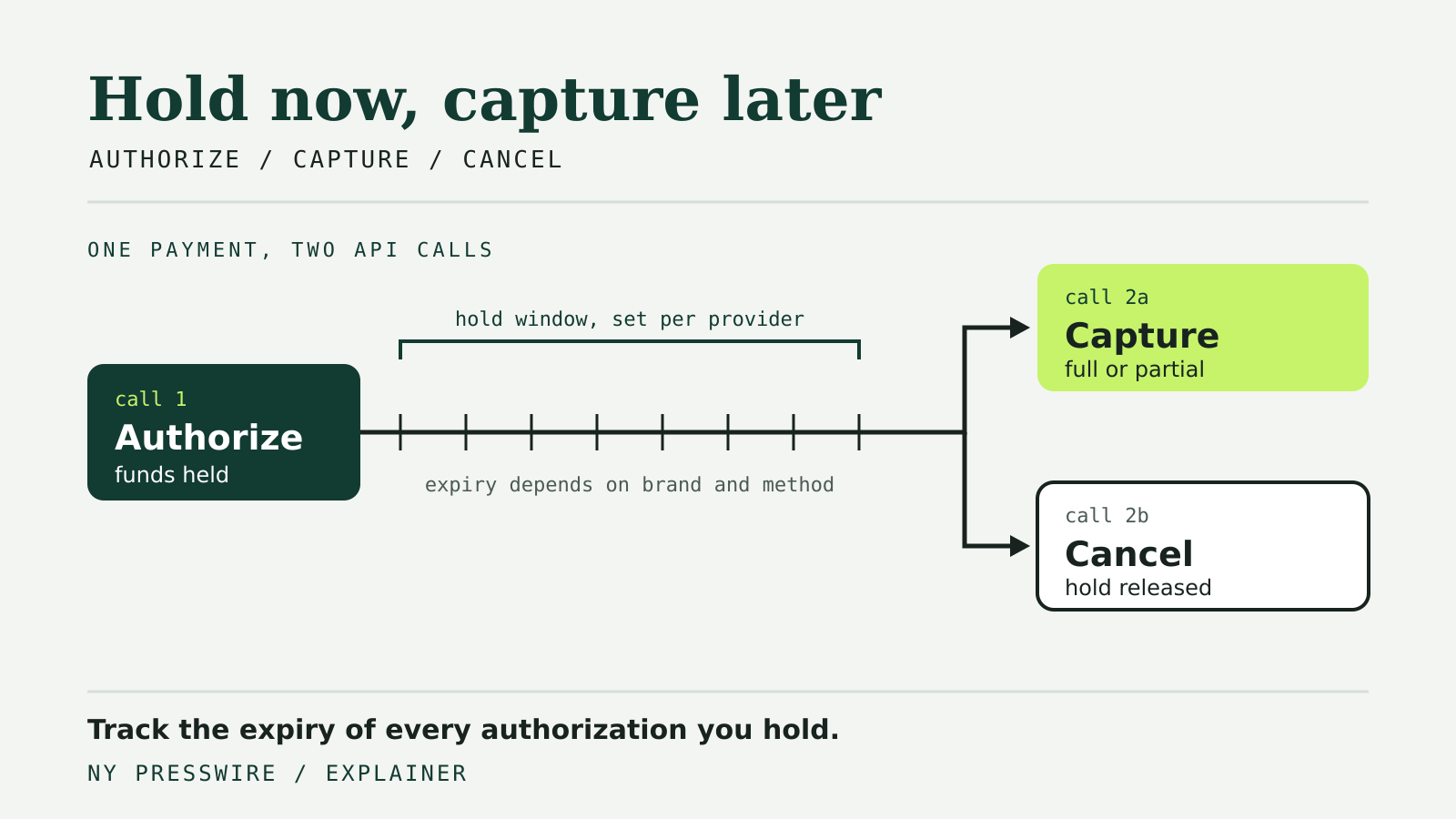
By default, a payment API usually approves and collects a card payment in one step. Adyen, for example, captures payments automatically right after authorization unless told otherwise. Authorize and capture splits that into two API calls. The first call places a hold on the customer’s payment method. The second call, made later, actually takes the money. In between, the merchant can check stock, ship the order or wait for a hotel guest to check out.
The pattern looks the same across providers at a high level, but the details that break integrations differ: how long a hold lasts, whether you can capture less than you authorized, whether a second capture is allowed, and what happens to an authorization nobody touches. This guide compares Stripe, Adyen, PayPal and Square using each provider’s own documentation.
The two calls, and the state in between
An authorization reserves funds without moving them. Adyen’s capture guide describes it plainly: the authorization reserves the funds on the shopper’s account, and the capture request transfers them to the merchant. Until capture, the payment sits in an intermediate state that your system has to track.
Each provider names that state differently:
| Provider | How you ask for authorization only | State after authorization | How you take the money | How you release the hold |
|---|---|---|---|---|
| Stripe | capture_method: manual on the PaymentIntent or Checkout Session | requires_capture | Capture the PaymentIntent | Cancel the PaymentIntent |
| Adyen | Manual capture, set in the Customer Area or per request | Authorized, waiting for capture | POST /payments/{paymentPspReference}/captures | Cancel the authorization |
| PayPal | intent=authorize in the JavaScript SDK, then authorize the order | Authorization CREATED | Capture the authorization | Void the authorization |
| Square | autocomplete: false on CreatePayment | APPROVED | CompletePayment | CancelPayment |
The table hides one important difference. Adyen treats capture as asynchronous: its capture response returns a status of received, and the outcome arrives later in a CAPTURE or, rarely, a CAPTURE_FAILED webhook. Code that marks an order as paid the moment the capture call returns can be wrong on Adyen even when the HTTP request succeeded. Our guide to payment webhook retries covers how to process those events safely.
How long a hold lasts
An authorization is not open-ended. If you do not capture in time, the hold lapses and the funds are released.
Stripe publishes validity windows by card brand. For online card payments initiated by the customer, Visa, Mastercard, American Express and Discover authorizations are valid for 7 days. For merchant-initiated Visa transactions the window is listed as 5 days, which Stripe notes is exactly 4 days and 18 hours to allow time for clearing. In-person windows are shorter: 2 days for Mastercard, American Express and Discover. Stripe exposes the deadline on the charge as payment_method_details.card.capture_before, and an authorization that expires moves the payment to canceled.
Square sets default thresholds of 36 hours for card-present payments and 7 days for card-not-present payments. You can shorten the window with delay_duration, but not extend it.
PayPal describes an authorization as a hold valid for 29 days, with a 3-day honor period in which it recommends capturing. After the honor period, you can reauthorize within the 29 days. A reauthorization creates a new authorization ID and restarts the honor period, so your system has to store the new ID and capture against it.
Adyen returns an error such as “Transaction is expired” when a capture request arrives after the authorization has lapsed, and its documentation lists reauthorization as an option in the Customer Area.
The practical lesson is to store the provider’s own expiry field or rule with every authorization, rather than a single global constant. Card brand, payment method and whether the card was present can all change the deadline.
What happens to a hold nobody captures
Providers make different choices about an orphaned authorization, and those defaults matter more than they look.
Square’s delay_action decides what happens at the deadline. By default it is CANCEL, so Square cancels the payment. An application can set it to COMPLETE so Square completes the payment instead, but only when the CreatePayment request does not specify an order ID.
Stripe has a private preview of automatic_delayed capture. With it, Stripe captures a card payment about 6 hours before the authorization expires unless you capture or cancel it first. A related capture_by parameter can target the authorization expiry, the end of the day in UTC, or a set delay of up to 30 days. Because it is a preview, do not build a production flow that depends on it without access.
Adyen offers delayed automatic capture as a configuration: you set a delay between authorization and capture, and the capture happens on its own unless you cancel first. Adyen notes that an automatically captured payment does not trigger a separate CAPTURE webhook unless you enable it for delayed capture in your webhook settings.
Partial and multiple captures
A common reason to authorize first is that the final amount is not known yet. An order may ship short, or a customer may remove an item.
Stripe lets you pass amount_to_capture to capture less than the authorized amount, and a partial capture releases the rest automatically. For most payments only one capture is allowed: once you capture part of the amount, you cannot capture the difference later. Some card payments are eligible for multicapture, and Stripe also documents overcapture for certain online card payments.
Adyen distinguishes a single partial capture, after which any unclaimed amount is canceled automatically, from multiple partial captures, where the remaining balance stays open. Multiple partial captures are disabled by default and must be enabled by Adyen support. Adyen recommends flagging the payment as a pre-authorization when you expect partial captures, and its reference field lets you tag each capture for reconciliation.
Square’s CompletePayment accepts an optional version_token, so the completion succeeds only if the payment has not changed since you read it. That optimistic concurrency check is useful when several workers might act on the same payment.
Which payment methods support it
Separate capture is mainly a card feature, but not only a card feature. Stripe lists cards, Affirm, Afterpay, Cash App Pay, Klarna and PayPal among methods that support it, and ACH and iDEAL among those that do not. Each method has its own rules: Stripe documents a 28-day capture deadline for Klarna and 13 days for the Afterpay balance. Adyen also says separate capture is available only for some payment methods and lists them separately.
If your checkout offers several methods, the capture model has to be decided per method. A flow that assumes every payment can wait for shipment will fail for methods that only support immediate capture.
Design checklist
- Record the authorization ID, amount, currency and the provider’s expiry for every hold.
- Treat capture as a state transition you confirm, not a fire-and-forget call. On Adyen, wait for the webhook.
- Send capture and cancel calls with an idempotency key where the provider supports one. PayPal’s examples use a
PayPal-Request-Idheader. See our guide to idempotency keys. - Schedule a job that captures or cancels well before the deadline instead of relying on provider defaults.
- Cancel holds you will not capture. Stripe notes that some card statements do not distinguish authorizations from settled payments, which can confuse customers.
- Check provider changelogs for changes to these fields. Our payment API changes tracker follows each provider’s versioning.