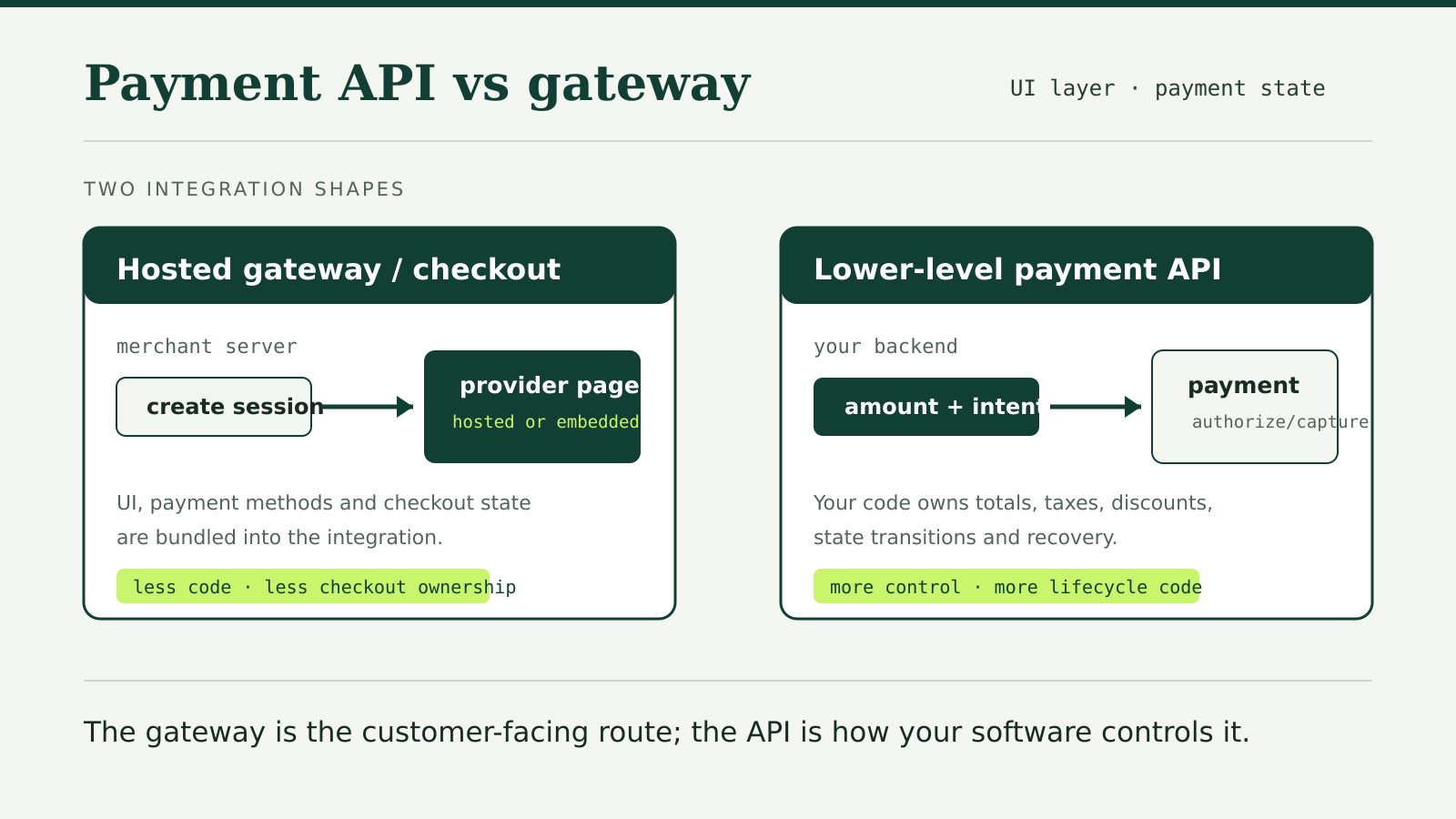
A payment gateway is the customer-facing route that securely collects payment details and passes a payment request into a provider’s system. A payment API is the software interface your application calls to create, authorize, capture, refund or inspect that payment. Modern providers often sell both together, so payment API vs payment gateway is usually a choice about integration depth rather than two unrelated services.
The useful question is not which label sounds more technical. It is which parts of checkout the provider owns and which parts your team must build, secure and maintain.
Gateway means a payment-entry route
A gateway historically described the service that connects a merchant’s checkout to payment processing. On the web, the visible part is usually one of three shapes:
- a hosted page that the customer visits or is redirected to;
- an embedded provider form inside the merchant’s page;
- provider-managed payment fields assembled into a custom layout.
Stripe’s online payments documentation shows all three. Payment Links lead to a hosted page without a custom site. Checkout can render as a full page or embedded form. Elements provides prebuilt fields for a custom payment page.
The names vary by provider, and “gateway” is not a standardized product class. One vendor may call the same layer Checkout, Hosted Fields, Drop-in or Smart Buttons. Compare what the integration does, not only the product name.
An API controls payment state
An API exposes operations your software can call. PayPal’s Orders v2 API, for example, has operations to create, retrieve, update, authorize and capture an order. Those calls represent state changes in the payment lifecycle.
A lower-level API gives the merchant more control, but it also moves more decisions into merchant code. Stripe contrasts its Checkout Sessions API with Payment Intents. Checkout Sessions can manage line items, taxes, discounts, shipping, subscriptions and currency conversion. With Payment Intents, Stripe says the merchant calculates the final amount and builds those surrounding checkout features.
That does not mean a direct API sends raw card details through your server. Provider components can tokenize sensitive details in the browser. Stripe says Elements sends payment information to Stripe without it touching the merchant’s server. Braintree describes a similar flow: its client SDK returns a single-use payment method identifier, and the merchant’s server uses that identifier in an API call.
They are layers, not rivals
A hosted gateway can still be API-driven. A merchant server creates a Checkout Session through an API, then the provider renders the page. An embedded form can tokenize card details while the merchant’s backend creates and confirms payment state through an API.
The layers look like this:
- Checkout interface: the customer enters or selects a payment method.
- Tokenization: sensitive details become a provider-controlled identifier.
- Payment state: an API creates, confirms, authorizes or captures the payment.
- Processing and settlement: the provider and payment networks move the transaction through authorization and settlement.
- Events and reconciliation: webhooks and reports tell the merchant what happened.
“Use a gateway” therefore does not mean “do not use an API.” It usually means choosing more provider-owned checkout and less merchant-owned UI or lifecycle logic.
Hosted checkout versus a lower-level API
| Decision | Hosted or provider-managed checkout | Lower-level payment API |
|---|---|---|
| Payment form | Provider supplies the page or component | Merchant composes the flow, usually with provider fields |
| Totals and line items | Session can hold the checkout model | Merchant code calculates and sends final values |
| Taxes, discounts and shipping | Often available as checkout features | Merchant integrates or rebuilds each capability |
| Payment-method changes | Provider can update the offered UI | Merchant may need to adapt its flow |
| Redirects and authentication | Often handled by the checkout product | Merchant must follow API states and client actions |
| Maintenance | Less checkout code | More control and more lifecycle code |
The right balance depends on the product. A simple store may value a hosted page that covers common payment methods and authentication steps. A marketplace, usage-based billing system or unusual order flow may need more control over how amounts and state are created.
What your server still has to do
A hosted page reduces front-end work, but it does not remove back-end responsibilities. The server still needs to:
- create the session or payment with a trusted amount;
- use restricted credentials and keep secret keys off the client;
- verify the final state through provider events or a server-side API read;
- make retries idempotent so a timeout does not create a second charge;
- reconcile refunds, disputes and settlement records.
Our guides to payment API authentication, idempotency keys and webhook signatures cover those controls separately.
Do not mark an order paid merely because the browser returned to a success page. Browsers close, redirects fail and client-side data can be altered. Treat the provider’s signed event or a server-side status read as the payment record.