A payment integration usually meets its rate limit on a bad day: a flash sale, a backfill script, a migration that lists every customer at once. The provider answers with HTTP 429 Too Many Requests, and what the code does next decides whether the problem clears in seconds or turns into failed checkouts and duplicate work.
Stripe, Square and PayPal all return 429 when they throttle a client, but they say very different amounts about where the line is. This explainer covers what the status code means, what each provider publishes, and how to build retries that back off without charging anyone twice.
What a 429 means
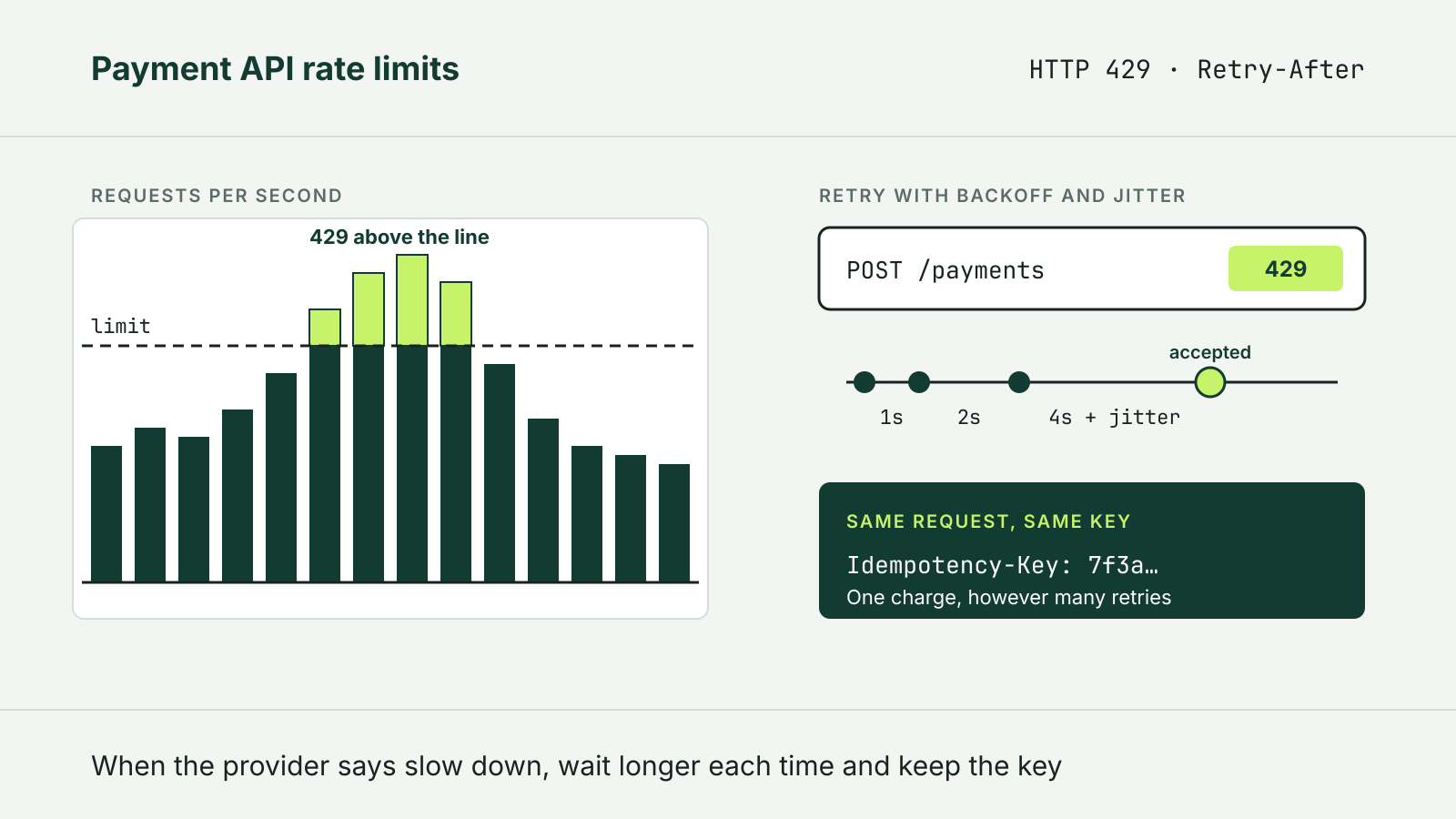
The 429 status code was defined in RFC 6585 in 2012. It means the client “has sent too many requests in a given amount of time.” The response should explain the condition and may include a Retry-After header saying how long to wait. The RFC deliberately leaves the counting to the server: limits can be per resource, per server or across a fleet, and the user can be identified by credentials or a cookie. A 429 response must not be stored by a cache.
Retry-After itself is defined in RFC 9110. Its value is either an HTTP date or a number of seconds, so Retry-After: 120 means wait two minutes. A client should be able to parse both forms.
What Stripe publishes
Stripe is the most explicit of the three. Its rate limits page measures limits in requests per second per Stripe account and lists numbers:
- a global limit of 100 requests per second in live mode and 25 per second in a sandbox;
- 25 requests per second for an individual endpoint unless noted otherwise, where each named operation counts as its own endpoint, so
POST /v1/payment_intentsandGET /v1/payment_intents/{id}are separate, while reads of different PaymentIntent IDs share one limit; - resource-specific caps, such as 1,000 updates per PaymentIntent per hour and 15 payout creations per second.
Separately, Stripe applies a concurrency limit, a cap on requests in flight at the same moment. The default for standard live traffic is 50. Stripe says hitting it usually points to long-running requests such as list calls or calls with expansions.
A throttled Stripe response carries a Stripe-Rate-Limited-Reason header with one of five values: global-rate, endpoint-rate, global-concurrency, endpoint-concurrency or resource-specific. That header is worth logging, because the fix differs: a rate problem calls for spacing requests out, a concurrency problem for running fewer at once.
Stripe also warns that a 429 without that header was not a rate limit. It may be an object lock timeout, returned with the code lock_timeout when another request or a Stripe process is holding the same object. The remedy is similar, retry with backoff, but frequent lock timeouts mean the integration is mutating one object from several workers at once and should queue those changes.
Two more Stripe rules affect design. Read requests have an allocation of an average of 500 per transaction over a rolling 30 days, with a minimum of 10,000 a month, while writes have no allocation limit. And Stripe discourages load testing against a sandbox, because sandbox limits are lower and its latency differs from live mode; it suggests mocking the API in load tests instead. For a large limit increase, Stripe asks for at least six weeks’ notice.
What Square and PayPal publish
Square’s error handling guide says that a high number of requests in a short period can lead Square to stop processing them temporarily and return RATE_LIMITED errors with a 429 status. It does not publish a number, and it notes that different endpoints may enforce different limits. Its suggestions are concrete: use batch and bulk endpoints, filter search and list calls to the data actually needed, and run API calls through a worker queue that puts a throttled task back on the queue for a later retry.
PayPal states plainly that it does not publish a rate limiting policy. It may rate limit traffic that appears abusive, returning 429 with RATE_LIMIT_REACHED, and adjusts its policies as traffic changes. Its two tips address common causes of self-inflicted throttling: use webhooks instead of polling, and cache OAuth 2.0 access tokens instead of requesting a new one for every transaction.
So only one of the three gives numbers a team can plan against. With Square and PayPal, the 429 itself is the signal, and the client has to respond to it rather than stay under a known ceiling.
Building a retry that behaves
The providers’ advice converges on the same pattern.
Back off exponentially, with jitter. Stripe and Square both recommend an exponential backoff schedule plus a random delay, so that many clients throttled at once do not all retry at the same instant. If a response includes Retry-After, wait at least that long.
Cap the attempts. A retry loop with no ceiling turns a short throttle into a long queue. After a set number of attempts, fail the job visibly and let a person or a scheduled task pick it up.
Throttle before the provider does. Stripe suggests a client-side token bucket that limits the rate of outgoing calls, and controlling traffic at a global level so it can be slowed when throttling appears. Square’s worker queue does the same job. Either one keeps a backfill from starving checkout traffic that shares the same account limit.
Separate rate from concurrency. A pool of 200 workers can break a concurrency limit even when the per-second rate looks safe. Size the pool to the provider’s limit where one is published.
Make every retried write idempotent. Backoff decides when to try again; it does not make the second attempt safe. A create or capture call that is retried after a timeout should carry the same idempotency key as the first, so the provider returns the original result instead of performing the action twice. How each provider stores those keys is covered in our explainer on idempotency keys in a payment API.
Do not read throttling as an outage. A 429 means the request was refused, not that the provider is down, and Stripe says a lock-timeout request was not processed at all. Treating either as a hard failure and alerting on every one creates noise.
A short checklist
- Log the status, any
Stripe-Rate-Limited-Reasonor error code, and the endpoint for every 429. - Retry with exponential backoff and jitter, honor
Retry-After, and cap attempts. - Send every retried write with its original idempotency key.
- Put bulk jobs behind a queue or token bucket so they cannot crowd out payments.
- Replace polling with webhooks, and cache access tokens.
- Do not load test against a sandbox and read its limits as production limits.
- Ask the provider for a higher limit well before a planned traffic spike.
For dated changes to these APIs, see our payment API changelog tracker, which follows Stripe, Square, PayPal and other providers.