A declined card payment comes back to your code as a short string or number, and that value decides what the checkout screen says, whether a subscription job tries again tonight and whether the card networks start counting your retries. Read it wrong and a customer with a typo in their CVC gets told to call their bank, while a reported-stolen card gets hammered with automated reattempts.
Stripe, Adyen and Braintree each translate the issuer’s answer into their own payment decline codes. This explainer covers where those codes come from, how the three providers expose them, which ones are safe to show a customer and how the networks’ retry rules change what a sensible retry looks like.
Where a decline code comes from
A card decline usually starts with the issuing bank. Stripe’s declines guide describes the issuer’s automated systems weighing signals such as spending habits, account balance, expiration date, address data and CVC before authorizing or refusing a charge. It separates three kinds of failure:
- Issuer declines, where the bank or payment provider said no;
- Blocked payments, where Stripe’s own Radar fraud screening stopped the charge before it reached the issuer;
- Invalid API calls, where the request itself was wrong.
The distinction matters for retries. A blocked payment never reached the card network, and an invalid call is a bug in your integration, so neither tells you anything about the customer’s card.
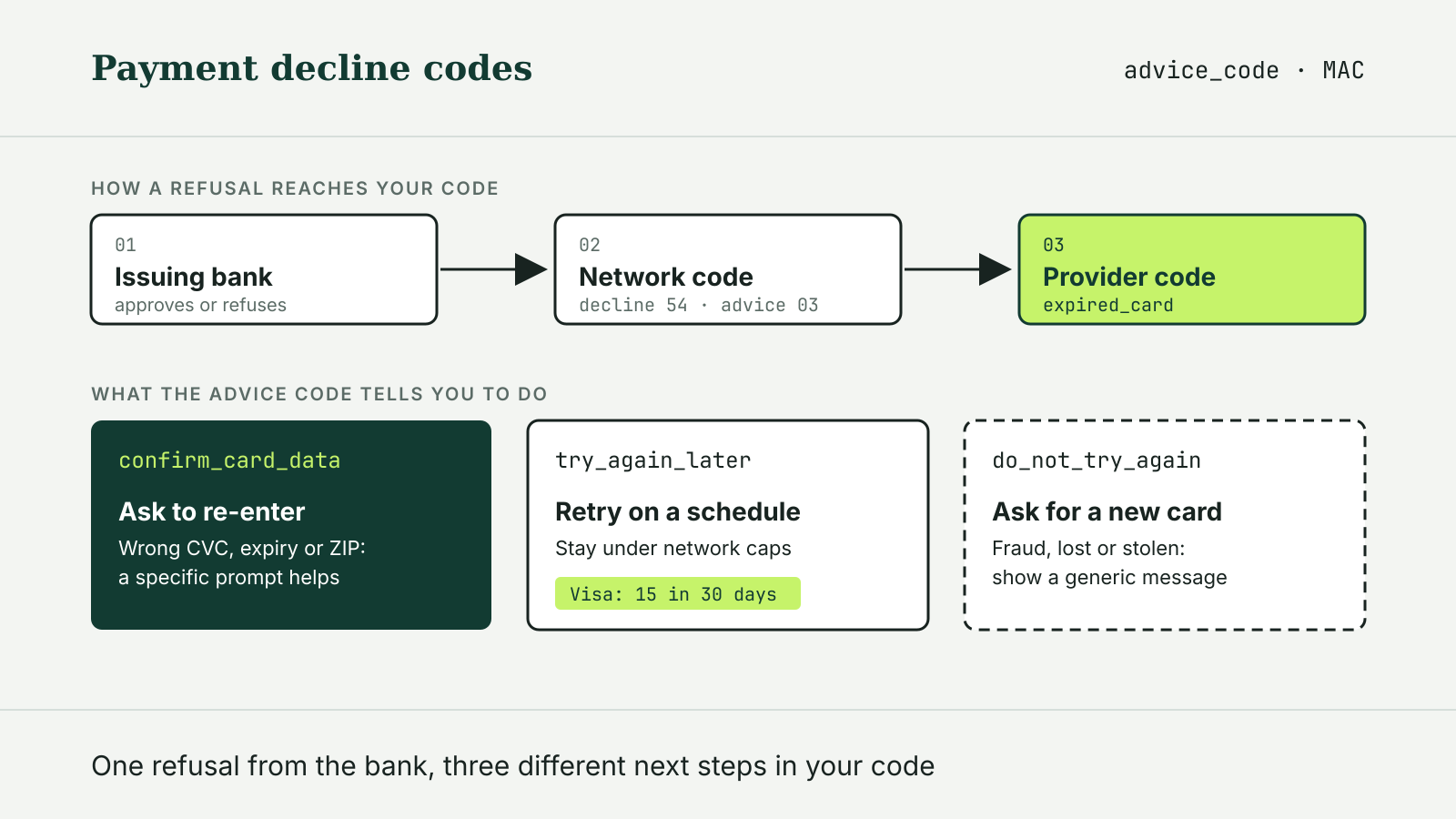
Behind the provider’s code sits a raw network code. Stripe’s card declines page says the issuer returns two of them: a network decline code and a network advice code, each two to four characters long, and their meaning differs by card brand, so the brand has to be read alongside the code. Mastercard calls its advice codes Merchant Advice Codes.
How Stripe reports it
On a Stripe charge, the outcome object carries the whole picture: type (issuer_declined, blocked or invalid), network_status, reason, the raw network_decline_code and network_advice_code, and Stripe’s own advice_code. In Stripe’s example of an expired card, the network decline code is 54, the reason is expired_card and the advice code is confirm_card_data.
That advice_code is the field to build on. Stripe documents three values:
do_not_try_again: do not use the card again for the same transaction;try_again_later: the issuer declined but the charge can be retried;confirm_card_data: some of the card information was wrong and the customer needs to check it.
Stripe’s decline code list then gives the detail: insufficient_funds, incorrect_cvc, expired_card, authentication_required and dozens more. Stripe notes that issuers put most declines in the generic bucket, generic_decline, and that banks discuss the specific reason only with their cardholders. For a PaymentIntent, the code sits in last_payment_error.decline_code, and the payment_intent.payment_failed webhook fires when an attempt fails.
How Adyen reports it
Adyen does not use HTTP errors for refusals. Its refusal reasons page says a refused authorization still returns HTTP 200, and the outcome is in three fields: resultCode (Refused, Error or Cancelled), refusalReason and a numeric refusalReasonCode. Code that only checks the HTTP status will treat every refusal as a success.
A few of Adyen’s codes map directly to the decisions above. 6 is Expired Card, 12 is Not enough balance, 24 is CVC Declined and 38 is Authentication required, meaning the issuer refused an exemption and wants the payment retried with 3D Secure. Code 27, Declined Non Generic, collects network responses that cannot be mapped reliably, which Adyen says makes generic declines such as Mastercard’s 05: Do not honor easier to tell apart from specific ones. Code 46 means Adyen itself blocked the attempt to keep the merchant from paying excessive retry fees, and 50 means the shopper disabled the token used for recurring charges. Adyen also returns the same values in the CAPTURE_FAILED and REFUND_FAILED webhooks when a capture or refund is refused.
How Braintree reports it
PayPal’s Braintree uses numbered processor responses. Its authorization response reference says 2000-class codes mean the processor declined the authorization, while 3000-class codes point to a problem in the back-end processing network. Braintree labels each code as a soft decline, a temporary issue where a retry may work, or a hard decline, where retrying the same payment method will likely fail. 2000 Do Not Honor and 2001 Insufficient Funds are soft; 2004 Expired Card is hard.
What the customer should see
All three providers say the same thing about fraud-related declines: do not tell the customer. Stripe instructs integrations to present fraudulent, lost_card, stolen_card and merchant_blacklist exactly as a generic_decline. Adyen says not to expose refusal details to shoppers at all, to prevent malicious use. Braintree says merchants typically show a generic message and recommends logging the processor response code so support can look it up later.
The practical split is between declines the customer can fix on the spot and everything else. A wrong number, CVC, expiry date or postal code deserves a specific prompt to re-enter the field. An authentication request deserves the 3D Secure flow, not an error. The rest gets a neutral message and a suggestion to try another payment method or contact the card issuer.
Retrying without paying for it
Retries are where decline codes turn into costs. Braintree’s declines article says Visa and Mastercard have introduced fees on excessive retries that affect every payment service provider. Braintree maps its codes to Visa’s four retry categories: Category 1 codes, such as 2015, are “do not retry,” while Categories 2 to 4, including 2000 and 2001, are limited to 15 retries over a rolling 30 days. For Mastercard, it says retries should follow the Merchant Advice Code, and that Mastercard charges a fee for every reattempt beyond 10 in 24 hours for MAC 03 and 21.
Stripe, without citing a network threshold, recommends no more than eight retries for charges that permit them and warns that issuers may read additional retries as potential fraud. Its Smart Retries feature picks retry times for Billing subscriptions, as Braintree’s Smart Retries does for its merchants.
A retry policy that follows these rules looks like this:
- Branch on the advice field first (
advice_codeat Stripe, the Merchant Advice Code where present), then on the decline reason. - Never retry a hard or “do not try again” decline with the same card; ask for a new payment method.
- Retry soft declines on a schedule, under both the provider’s and the network’s caps, and stop when they are reached.
- Route
authentication_requiredor Adyen’s code38to 3D Secure instead of a blind retry. - Keep the same idempotency key when a request timed out and its result is unknown; a new decision after a decline is a new attempt. Our explainer on idempotency keys in a payment API covers the difference.
For declines you are trying to reproduce in testing, see our analysis of payment API sandbox testing: test cards return scripted codes, not real issuer behavior. Providers also rename and add codes over time; our payment API changelog tracker follows dated changes at Stripe, Adyen, Braintree and others.